




BLC

BLC

Loading


TB series

G Series
Hot plug design between PCB board and box 5V safe voltage, easy to maintain, safe and durable.
Vector

Furniture Craftsmanship

Furniture-Craftsmanship

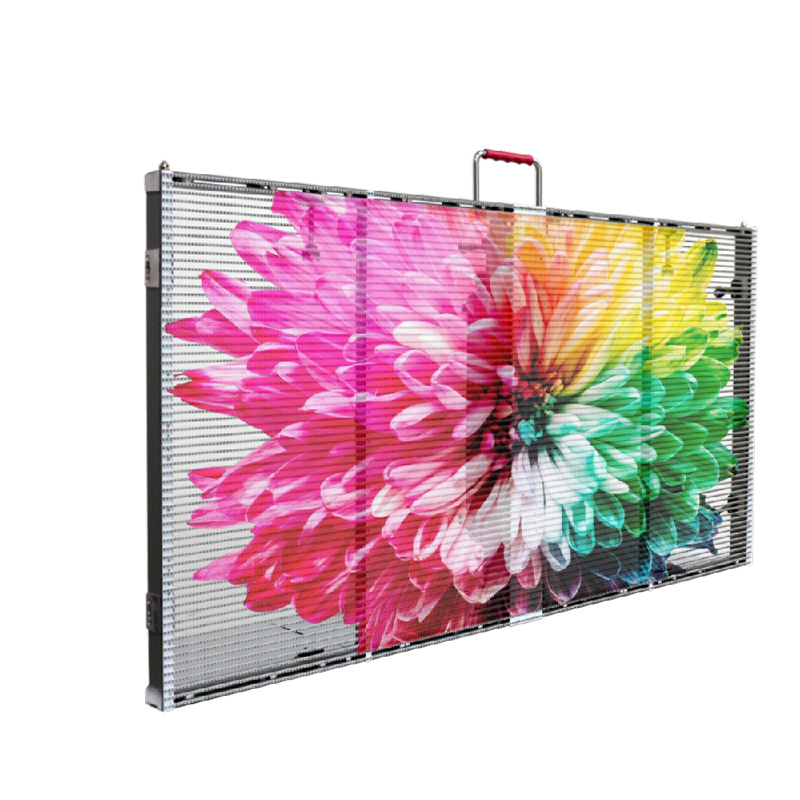
Our product is a full-colour LED display. It is an electronic display device composed of light-emitting diodes (LEDs), which presents images by controlling the on/off states and colour variations of red, green, and blue LEDs. It is suitable for indoor and outdoor advertising, stages, and similar scenarios.

All our models achieve refresh rates of 3840Hz/7680Hz. Examples include P1.25, P1.86, P2, P2.5, P2.976, P3.91, etc.

The number indicates the centre-to-centre distance between LED pixels (pixel pitch). A smaller number signifies higher resolution, resulting in a clearer display image.

The BLC team can assist with model selection. Clients should consider viewing distance, ambient brightness (indoor/outdoor), budget, and content requirements (e.g., video playback necessitates a high refresh rate).

Yes. Materials, dimensions, and shapes can all be customised. The BLC team can tailor products based on clients' design drawings. The BLC team offers complimentary logo printing services.

LED screens offer high brightness (adjustable), extended lifespan (over 10 years), suitability for both large and small displays indoors or outdoors, and seamless splicing capability. LCD screens are better suited for close-range, small-area displays.

The BLC team provides a complete product solution. Customers need not purchase additional equipment.

send us free message


recent blog articles

Soft Connection vs Hard Connection of LED display

20
November
Soft Connection vs. Hard Connection: Which is Right for Your LED Display? With LED displays, one would always want to ensure flawlessness and seamlessness in the visual display. This is because a uniform, stable screen ensures that your content looks its best. Because both soft and hard connection methods are designed to link LED modules together, many installers and project managers wonder which of them is better. Having dealt with LED displays for years, these two connecting technologies have differentially affected the final results of a project in the light of installing speed and long-term durability. So, in this article, I’ll help you settle the soft connection vs. hard connection debate once and for all so that you know exactly which to choose for your next LED display. Ready to get started? Let’s dive in. In This Article Introduction to LED Display Connection Technologies What is Hard Connection of LED Screen? What is Soft Connection of LED Display? Making the Right Choice: Soft Connection or Hard Connection? Conclusion Introduction to LED Display Connection Technologies As we all know, any large-scale LED display system is modular in nature, typically consisting of a multitude of smaller panels or modules that are combined to form one continuous visual canvas. Connections within these modules serve two major purposes: providing a stable physical structure and transmitting power and data signals precisely throughout the screen. It is usually achieved by two dominant approaches: hard connections and soft connections, each having its own engineering philosophy. What is Hard Connection of LED Screen? First, let’s talk about the hard connection. The Hard Connection technology, as the name would suggest, depends on rigid and fixed structures mechanically. Hard Connection can be thought of as precision-engineered, where modules are mechanically locked in place by use of metal components, positioning pins, screws, and other firm clasps. This connection method is all about the importance of structural integrity, perfect alignment, and stability. Sometimes we call this connection a wireless connection. The most common installation of hard-wired display systems incorporates data and power lines into a single, consolidated backplane or hub board, which reduces loose wiring and provides an overall robust, clean installation. Advantages and Disadvantages Here’s a table showing the advantages and disadvantages of hard connections for LED displays: Pros Cons High Stability\tLimited Flexibility Hard connections offer a strong and rigid connection between modules, restricting movement and misalignment. Not suitable for applications requiring frequent adjustments or relocations. Durability Higher Initial Cost Less prone to damage, therefore reducing maintenance costs in the long run. Generally more expensive upfront than soft connections. Stable Transmission of Signals\tExtra Cost of Maintenance Reliably transmits data and power with minimal interference. Consistent maintenance is required; although the cost of LED modules could be much lower, the necessity of additional hub cards can raise the overall cost. Excellent Heat Dissipation Increased Module Replacement Cost The rigid structure effectively manages heat to extend the life span of LEDs. The replacement of modules and Hub board individually might be expensive because some components are unique. Precision Alignment It achieves high flatness and alignment for the screen displays. Easy Installation Plug-and-play design simplifies setup and allows for front service access. Lightweight Lighter weight generally allows for easier handling and installation. Aesthetic Appeal Clean design with no complex wiring connections makes it more visually appealing. What is Soft Connection of LED Display? Soft Connection technology takes the opposite tack, embracing flexibility: power cables, flat data cables to link modules. Because this method allows for some movement and tolerance between modules, it’s ideal for installations that are not flat or require a more forgiving assembly process.   The soft connection of the LED screen is also called a wired connection. Advantages and Disadvantages Pros Cons Flexibility\tPotential Signal Interference Ideal for irregular or curved surfaces, allowing for creative designs. May be more susceptible to signal interference that may affect its performance. Cost-Effective Durability Concerns Lower up-front cost usually than with hard connections. More susceptible to damage over time, thereby bringing higher maintenance Lightweight Design\tComplex Installation Lighter weight can ease handling and installation. Installation can require complex cable connections between modules and receiver cards. Modular Upgrades Aesthetic Issues Easier to replace or upgrade individual modules without major disruption. It can appear messy with tangled wires, leading to a less tidy look. Making the Right Choice: Soft Connection or Hard Connection? Now we have understood all the pros and cons. You perhaps wonder: Soft Connection or Hard Connection? Which should I choose? Generally speaking, choosing a hard or soft connected display always requires matching the task’s needs in striking a balance among aspects such as visual quality of display, installation environment, usage duration, and budget. Below are key factors to consider when deciding between soft and hard connections for LED displays: Installation Complexity HardConnections: Generally easier to install, requiring fewer tools and less technical expertise. Ideal for quick setups. Soft Connections: An installation process that is more complex, perhaps requiring special tools and skills. This can result in longer setup times. Application Scenarios: Soft Joints: Appropriate for irregular or curved surfaces where some flexibility is required. They allow for imaginative designs and easier adjustments. Hard Connections: More applicable to stable environments, control rooms, conference rooms where durability and stability are highly essential, such as permanent installations in commercial establishments. Visual Quality: Soft Connections: May provide lesser accuracy in regard to alignment and hence may affect the overall appearance. However, they can adapt to various design requirements. Hard Connections: These offer superior flatness and alignment, thus giving higher visual quality, especially for high-resolution displays. Budget: Soft Connections: Costly at the start, these come with higher initial costs. Hard Connections: Higher upfront costs, but these could lead to lower maintenance expenses over time since they are strong and steady. Conclusion In this post, the basic concepts and key considerations for choosing between soft and hard connections for LED displays have been discussed. Not sure which option is best for your project? Please take a moment to research what best suits your particular needs and priorities. Please do not hesitate to contact us for further assistance or inquiries regarding your project. We are here to guide you through making the right choice for your LED display!
Front Service vs. Rear Service: Which is Best for LED Display

20
November
When it comes to the installation and maintenance of LED displays, your number one priority is always reliability, visual quality, and smooth operation. Whether the LED display is lighting up a retail store, driving a mission-critical operation center, or catching the eye in a busy city square, the way you maintain your LED display impacts everything from performance and aesthetics to long-term cost. Both front service and rear service are proven approaches for keeping your LED screens up and running. But which one is truly best for your needs? This is a common question for both newcomers and seasoned industry professionals alike. In this article, I go in-depth into the “Front Service vs. Rear Service” debate. You’ll get a clear understanding of what each method offers, their differences, and practical tips on how to choose the best fit for your LED project-so you can make an informed decision for your display’s long-term success. Ready to get started? Let’s dive in. In This Article   Introduction What is front service? What is rear service? The Difference Between Front Service and Rear Service The Pros and Cons of Front Service and Rear Service How to Choose the Right Maintenance Method for Your LED Display Conclusion Introduction LED displays have become the visual heartbeat of our built environment, from colossal outdoor billboards crowning city skylines to sleek wall-flush lobby screens, from immersive retail façades to mission-critical control rooms. LEDs deliver brightness, color fidelity, and dynamic content with remarkable efficiency. Yet, behind the pixels, there is one underlying decision that quietly shapes the entire life cycle of your screen: how you will maintain it. While specifications like pixel pitch, brightness, and refresh rate tend to dominate selection conversations, the maintenance method is just as important: front service or rear service. It will define where you can physically install a screen, how quickly you can resolve faults, how much structural space you must devote, how your team will work safely, and, ultimately, what your TCO will be over years of operation. Generally speaking, for the maintenance of LED screens, there exist mainly two popular methods: front service and rear service. What is front service? Front service is a single and direct maintenance method, engineered for environments where space behind the LED display is limited or entirely unavailable. With front service, technicians perform all maintenance actions—module replacement, power and signal access, and fine adjustments—from the front of the screen. At present, the ways to achieve front service mainly include using magnetic mounting screws or front fixed screws (mainly for outdoor screens). 1. Magnetic Mounting Screws This is the most common method for indoor LED displays. The core enabler is a magnetic mounting system: Each module has strong magnets to attach it magnetically to cabinet structures and typically includes a mechanical lock or “anti-drop” feature against detachment by accident. This allows for quick installations with modules being held securely but enables the removal of a single faulty module for service without access to the back. Think of front service like replacing a tile on a finished mosaic without removing the wall. You use a specialized suction tool to lift the single tile (module) straight out from the front, swap it, and set it back into the exact place—no need to get behind the wall. The magnetic design allows for quick and easy removal, while modules snap back into place with little effort to ensure installation remains flat and precise. 2. Front Fixed Screws With Rotary Wrench Service at the front for larger and more robust outdoor LED screens is normally performed through front fixed screws combined with a rotary wrench. Here, each module is screwed on from the front by special screws that can be removed with a rotary wrench. Such a design will keep every module secure and firm, even in unfavorable weather conditions. If maintenance is needed, a technician accesses the screws from the front, loosens them with the rotary wrench, and removes the faulty module for repair or replacement. This approach provides extra security and stability for outdoor scenarios where the display faces wind, vibration, or other environmental stress. Both of the front service methods eliminate the need for rear access, offering efficient maintenance with minimal disruption and opening up new possibilities for where and how you install your LED display. Where front service fits best: Tight, wall-flush installations–e.g. TV Studio, churchs, hotel and retail feature walls. Applications that are recessed or embedded, such as glass curtain walls, with impossible back access. Complicated forms-curves, cylinders, or any customized integrations into architecture-where the “reverse” side is unavailable or does not exist in a useful manner. Areas where the focus is on visual integration or architectural cleanliness, and a back maintenance room or corridor opening would disturb that. In short, front service is the solution when the screen has to be up close and personal with the built environment and back access just isn’t practical, and every millimeter in depth counts. What is Rear Service? Rear service is a traditional approach to LED maintenance. The design assumes that technicians will access and service the screen from behind, and this needs a dedicated maintenance corridor or backstage large enough for safe movement and work. A typical rear clearance is on the order of 60-80 cm-or more-depending upon the structure and local safety practices. Technicians enter this space to unbolt and remove modules, power supplies, or receiving cards from the rear of cabinets. Cabinets are mechanically fastened—by means of screws or bolts—onto sturdy steel frames designed to support weight, wind loads if outdoors, and long-term structural stability. Where rear service fits best: Large outdoor billboards and rooftops with dedicated steel structures with safe back access. Control centers, broadcast walls, and facilities that can provision a planned maintenance corridor. Indoor installations where architectural space is ample enough for a rear room or aisle that can be safely used. If architectural space allows and if the proven stability and familiarity of traditional installations are desired, rear service often remains the logical and cost-effective choice. The Difference Between Front Service and Rear Service Here’s a detailed comparison that pinpoints the main differences. Feature Front Service Rear Service Maintenance Direction From the front of the display From behind the display Space Required No rear space needed; can be wall-mounted Requires rear access/corridor for maintenance Typical Application Indoor, wall installation, unique shape installations Outdoor giant screens, rear access rooms Module Removal Method\tMagnetic mounting screws or front fixed screws with rotary wrench\tUnscrew modules from the back using traditional screws/bolts Installation Complexityušually simpler; modules accessible directly Structure and corridor planning required Aesthetic Integration Allows for flush or embedded installations Usually requires visible frame or access space Speed of Maintenance Quick; front suction tools, rotary wrench Slower; more steps towards faulty modules Cost Slightly higher because of specialty components Often lower product cost, higher structure cost Suitability Best for locations of limited or no rear access Ideal where rear access is feasible and safe Environmental Security Magnetic/locking system, front screws (outdoor) Traditional bolts, more robust against tampering Heat Dissipation Needs careful design for airflow (wall flush) Easier rear ventilation management Advantages and Disadvantages of Front Service and Rear Service Pros and Cons of Front Service Pros Cons Allows maintenance from the front – no rear access needed. Usually higher initial product cost because of special design. Ideal for wall-mounted, embedded, or tight spaces Magnetic modules may be less robust against vibration indoors only Faster and easier module replacement; less downtime. Precision installation needed to ensure flat, seamless surface Allows for creative shapes and flush installations. Heat dissipation needs to be carefully designed in wall-flush installs. Less damage to building structure or existing design. For outdoor: Installing/removing front screws can be slower. Normally requires only a single technician to change out module(s) Special tools needed-suction cup, rotary wrench Advantages and Disadvantages of Rear Service Pros Cons Heavy-duty structure, strong stability-better wind/vibration resistance. Maintenance corridor/space behind the screen required More cost-effective product and cabinet for large/outdoor screens Not suitable for wall-flush or tight installations Traditional screw/bolt fixing is secure and familiar Module replacement takes more time and labor Excellent heat dissipation via rear ventilation Maintenance may cause disruptions backstage Easier to manage and maintain large-screen or outdoor LED screens; multiple technicians may be needed to work safely behind the screen. Simpler structure for robust environments Access is more difficult for creative shapes or designs How to Choose the Right Maintenance Method for Your LED Display Now, we have learned the pros and cons of front service and rear service. You might wonder: how to choose the right one for my next LED display? Use this simple decision path to narrow your choice quickly: 1. Do you have usable rear space? If “no,” select front service. The lack of a safe, accessible corridor essentially demands it. If “yes,” both options remain viable; proceed to functional priorities. 2. What is most important to you in your surroundings? Maximum structural stability and lowest initial product cost: Rear service is especially favored in large outdoor or industrial contexts. Minimum down time and ease in serviceability: prefer front service; one-person module swaps from the front can be decisive operational advantage. Architectural integration and aesthetics: Front service is preferred for wall-flush, recessed, or creative shapes. 2. Budget alignment Front service typically carries a 5-10% product premium. If your budget is tight and space permits, rear service can free funds for pixel pitch, content systems, or other value-adds. If lifecycle costs and operational continuity are the key drivers, front service can offset its premium through lower maintenance labor and reduced disruption over 5–8 years. Scenario-based guidance: Retail flagships and hospitality lobbies: Front service-space is at a premium, and aesthetics drive value. Control rooms and broadcast walls: Either can work; if a rear corridor is planned, rear service is viable; if fast front access and minimum disruption are what matter most, front service is attractive. DOOH billboards and rooftops: Rear service—robust structures, proven stability, and easy airflow usually win. Creative shapes (cylinders, curves, spheres, cubes, embedded façades): Front service—front access is usually the sole practical approach Conclusion In this article, we explored the difference between front service and rear service for LED displays via their core concepts and features. We demonstrated how it is the space constraint, maintenance speed, aesthetic, and long-term operation that shape choices more than any single spec number. We compared their advantages and disadvantages, pointing out where each one thrives, and provided guidance on how to choose to minimize risks and guesswork. If you still have questions, would like help applying this framework to your site specifically, or if you’d like a comprehensive analysis, just contact us. We’ll help you match the right maintenance approach to your environment so your LED display delivers the performance, reliability, and visual impact you expect-on day one and for years to come.
Home
WhatsApp
Email
Contacts